

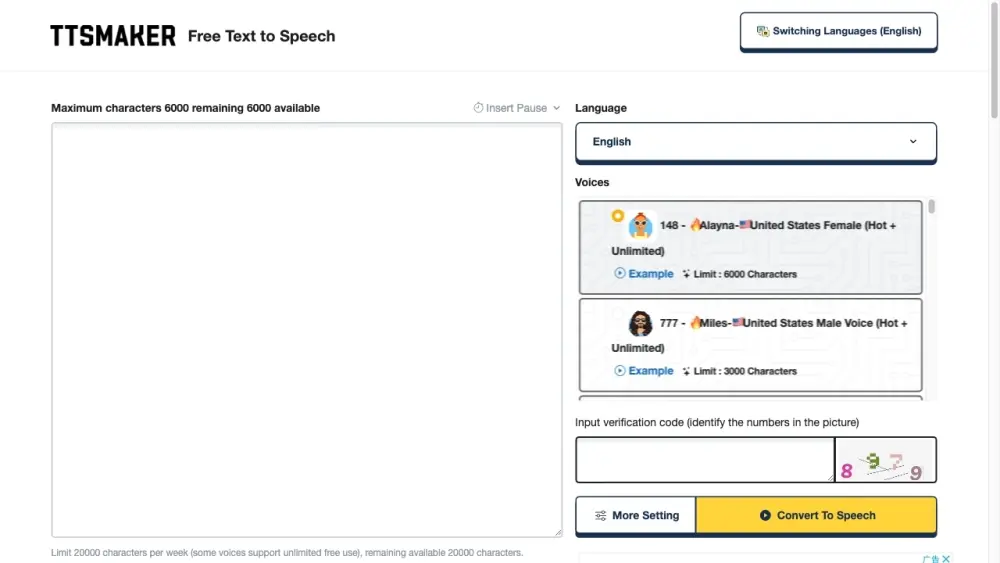
Overview
What if you could generate natural-sounding voiceovers for any project, entirely for free and without copyright restrictions? TTSMaker is a robust AI text-to-speech tool that converts written text into high-quality audio across a vast library of over 100 languages and 300+ voice styles, making professional-grade speech synthesis accessible to everyone.
Key Features
- Extensive Language Library: Supports text-to-speech conversion in over 100 languages, covering major global languages like English, Spanish, Arabic, Chinese, Japanese, and Korean for truly international applications.
- Diverse Voice Styles: Offers a selection of more than 300 distinct AI voice styles, allowing users to find the perfect tone, gender, and accent for their specific content and target audience.
- Unlimited Free Usage: Provides generous access to its core synthesis engine without imposing daily usage limits, enabling extensive projects without immediate financial investment.
- Full Commercial Rights: Grants users 100% copyright ownership of all generated audio files, permitting legal use in commercial projects like advertisements, paid courses, and product demos.
- Multiple Output Formats: Allows users to download their synthesized speech in various audio formats including MP3, WAV, OGG, and more for compatibility with different media players and editing software.
- Customizable Audio Parameters: Features adjustable settings for speech rate, pitch, and volume, giving users fine-grained control over the final sound and emotional tone of the output.
- Neural Network Engine: Utilizes advanced AI and deep learning models to produce high-quality, natural-sounding speech that closely mimics human intonation and rhythm.
- User-Friendly Interface: Designed with a simple, intuitive layout that makes the text-to-speech conversion process straightforward for users of all technical skill levels.
- High Character Limit: The free plan allows for up to 20,000 characters per conversion, accommodating lengthy paragraphs or short articles in a single processing step.
- Web-Based Platform: Operates entirely online through a web browser, eliminating the need for complex software downloads, installations, or system updates.
Pros
- Cost-Effective Solution: Completely free to use for both personal and commercial purposes, removing a significant financial barrier for creators and small businesses.
- Exceptional Language Support: The support for over 100 languages is far more extensive than many competing tools, making it ideal for global content creation.
- Clear Copyright Terms: The explicit grant of full commercial rights and copyright ownership provides peace of mind and legal security for professional use.
- Straightforward Operation: The clean and simple interface ensures a minimal learning curve, allowing users to generate audio within seconds of visiting the site.
- No Account Required: Users can start converting text to speech immediately without the obligation of creating an account or providing an email address.
- Rapid Processing Speed: The powerful backend infrastructure ensures fast conversion times, even for longer text segments, enhancing workflow efficiency.
Cons
- Variable Output Quality: The naturalness and clarity of the generated speech can fluctuate noticeably between different languages and specific voice styles.
- Weekly Character Restriction: The free plan imposes a weekly character limit, which may be constraining for users with very high-volume conversion needs.
- Limited Advanced Controls: Lacks more sophisticated features like SSML support or fine-grained emotional control that are found in some premium enterprise TTS services.
- Internet Dependency: Being a web-based tool, it requires a stable and continuous internet connection for all synthesis tasks, limiting offline usability.
- Basic Audio Editing: The platform focuses on synthesis rather than post-production, offering no built-in tools to edit or clean up the audio after it is generated.
Use Cases
- Video Content Creation: Generating clear and engaging voiceovers for YouTube explainers, social media clips (TikTok, Reels), and promotional videos without hiring a voice actor.
- Audiobook and Podcast Production: Converting written manuscripts, articles, or blog posts into audio format to create accessible audiobooks or podcast narration quickly.
- E-Learning Module Development: Creating audio narrations for online courses, training materials, and educational videos to improve learner engagement and comprehension.
- Accessibility Enhancement: Providing an auditory version of written text to assist visually impaired users or those with reading difficulties like dyslexia.
- Multilingual Marketing: Producing voiceovers for advertisements, product demos, and IVR systems in multiple languages to effectively reach a global customer base.
- Language Learning Aid: Helping language students hear correct pronunciations of foreign words and phrases, aiding in listening comprehension and speaking practice.
- Prototyping and Ideation: Quickly generating temporary voice tracks for video game dialogues, animation storyboards, or presentation drafts during the early creative process.
Quick Start Guide
Using TTSMaker is a simple, three-step process. First, type or paste your text into the input box on the website. Second, select your desired language and preferred voice style from the available options. Finally, click the 'Convert to Speech' button, wait a moment for processing, and then download your audio file in the format of your choice.
Conclusion
TTSMaker stands out as an exceptionally powerful and accessible entry-point into the world of AI-generated speech. Its most compelling advantage is the combination of a truly free tier and unambiguous commercial rights, a rarity that empowers individual creators, educators, and small businesses. While the audio quality may not always match that of premium, paid enterprise solutions, its vast language support and ease of use make it an invaluable tool for a wide array of applications. It is highly recommended for anyone needing quick, cost-effective, and copyright-safe voiceovers. For users with basic to moderate needs, TTSMaker is likely more than sufficient; those requiring broadcast-level quality or extremely high volume should evaluate premium alternatives.
Frequently Asked Questions
Yes, absolutely. TTSMaker explicitly states that users retain 100% copyright ownership of all generated audio files, which can be used for any legal purpose, including commercial projects like advertisements, monetized videos, and paid products.
The free plan allows for conversions of up to 20,000 characters per individual task. There is also a weekly limit on the total number of characters you can convert, though the exact figure for the weekly cap is not explicitly stated on the site.
You can download your generated speech in multiple common audio formats, including MP3, WAV, OGG, AAC, and OPUS. This provides flexibility depending on your need for quality or file size.
No, you do not need to create an account or provide any personal information to use the basic text-to-speech conversion features on TTSMaker. You can start using it immediately upon visiting the website.
The quality is generally very good for a free tool, especially in popular languages. However, it may not consistently match the highest fidelity and naturalness of top-tier paid services from companies like Amazon, Google, or Microsoft, which use more advanced AI models.
Yes. TTSMaker provides settings that allow you to customize parameters such as speech rate (speed), volume, and pitch, giving you some control over the final sound of the generated audio.
Based on the provided information, TTSMaker appears to be a web-based platform without a mentioned public API. It is primarily designed for direct use through its website interface.


