

Overview
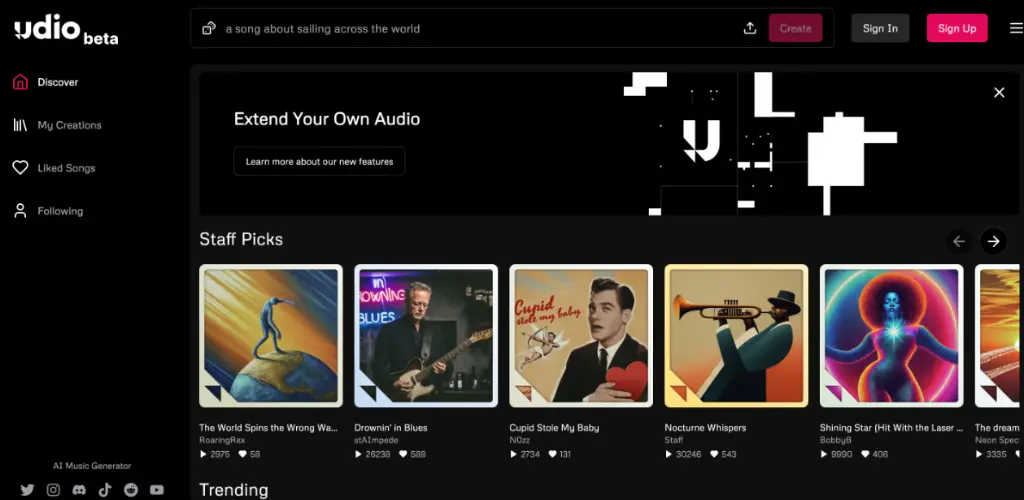
What if you could compose an entire song simply by describing it? Udio is an AI-powered music generation platform that turns text prompts into complete, high-quality music tracks. It empowers both musicians and non-musicians to create original compositions, from simple melodies to full-blown productions with vocals and instrumentation, all through an intuitive interface.
Key Features
- Text-to-Music Generation: Core functionality that transforms descriptive text prompts into complete musical compositions, handling melody, harmony, and structure.
- Genre and Style Flexibility: Capable of producing a vast array of musical genres, from classical and jazz to electronic pop and hip-hop, based on user direction.
- Lyric Integration: Allows users to input custom lyrics, which the AI then sets to music with appropriate vocal melodies and phrasing.
- Extended Generation: Enables the creation of longer, more complex song structures beyond short loops, facilitating full verses and choruses.
- Audio Quality Output: Renders final tracks in high-quality audio formats suitable for both casual listening and more serious creative projects.
- Community Sharing: Features built-in platforms for users to share their creations with the Udio community and discover music made by others.
- Iterative Refinement: Provides tools to regenerate sections of a track or extend existing ideas, offering control over the creative outcome.
- User-Friendly Interface: Designed with simplicity in mind, requiring no prior music theory knowledge or technical expertise to start creating.
Pros
- Democratizes Music Creation: Lowers the barrier to entry for music production, making it accessible to anyone with an idea, regardless of musical training.
- Rapid Prototyping: Incredibly fast for brainstorming ideas, sketching out song concepts, and generating inspiration for further development.
- High-Quality Output: Produces surprisingly polished and coherent music that often rivals early demo recordings made with traditional digital audio workstations.
- Creative Freedom: Allows exploration of genres and styles outside a user's personal instrumental or compositional skill set.
- Intuitive Workflow: The text-based prompt system is straightforward to learn and use, minimizing the initial learning curve.
- Free Tier Available: Offers a generous free usage tier, allowing users to extensively test the platform's capabilities without financial commitment.
Cons
- Limited Fine Control: While great for inspiration, it offers less granular control over individual musical elements compared to professional DAWs.
- Output Randomness: Results can sometimes be unpredictable, and hitting upon the exact sound envisioned in a prompt may require several attempts.
- Copyright Ambiguity: The ownership and copyright status of AI-generated music can be complex and may present issues for commercial use.
- Audio Fidelity Ceiling: While good, the audio quality may not yet meet the professional standard required for final commercial release in all contexts.
- Melodic Originality: There is a possibility of generating melodies that unintentionally resemble existing songs, a common challenge in AI generation.
Use Cases
- Content Creator Soundtracks: Perfect for YouTubers, podcasters, and filmmakers needing quick, original, and royalty-free background music tailored to their content's mood.
- Songwriting Inspiration: Musicians and songwriters can use it to break through creative blocks, generate chord progressions, or brainstorm melodic ideas.
- Educational Tool: Teachers can use it to demonstrate musical concepts like genre, structure, and instrumentation in a engaging, interactive way for students.
- Game Development: indie game developers can rapidly prototype soundscapes and musical themes for different levels, characters, or game environments.
- Marketing and Advertising: Agencies can generate unique jingles and short audio logos for campaigns quickly and cost-effectively based on a brand's description.
- Personal Projects: Individuals can create custom music for personal events like weddings, birthdays, or anniversary videos without commissioning a composer.
Quick Start Guide
1. Describe Your Song: Go to Udio and type a detailed prompt into the search bar. Include genre, instruments, mood, and any specific lyrics. 2. Generate and Refine: Click create. Listen to the output and use the 'Remix' or 'Extend' features to refine the track or make it longer. 3. Download and Share: Once satisfied, download your track in high-quality audio format or share it directly to the Udio community feed.
Conclusion
Udio stands as a significant leap forward in democratizing music creation. It is less a replacement for a professional music producer and more a powerful catalyst for creativity. Its greatest strength lies in its ability to instantly materialize ideas, making it an invaluable tool for inspiration, prototyping, and content creation. For professionals, it's a brilliant sketchpad; for everyone else, it's a gateway to musical expression. While it has limitations in precision and professional polish, its intuitive design and powerful output make it highly recommended for anyone looking to explore AI-generated music. Start with the free tier to experiment thoroughly.
Frequently Asked Questions
Yes, Udio offers a generous free tier that provides a substantial number of credits for generating songs, allowing users to explore its core features without any payment.
The free tier is primarily limited by the number of monthly generation credits. Paid subscriptions offer more credits, higher priority generation speeds, and potentially extended audio length.
You should carefully review Udio's Terms of Service regarding copyright and licensing. Typically, AI-generated content exists in a legal gray area, and commercial use may have specific restrictions or require attribution.
No, Udio is a web-based application that runs directly in your browser. There is no need to download or install any dedicated software to use it.
Udio can generate extended musical pieces. The exact maximum length may vary between the free and paid tiers, but it is designed to create full song structures, not just short loops.
Yes, a key feature of Udio is the ability to provide your own custom lyrics. The AI will interpret them and generate a vocal melody to fit the music it creates.
Udio is exceptionally versatile, capable of generating a wide spectrum of genres, including rock, pop, classical, hip-hop, electronic, jazz, and many more, based on your text prompt.


