Overview
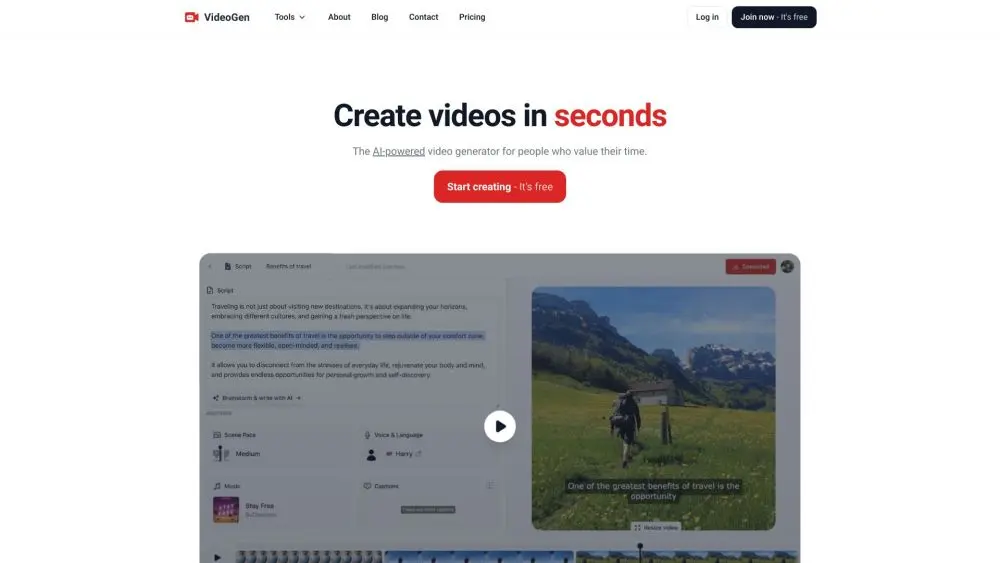
What if you could produce a professional video in seconds, not days? VideoGen is an AI-powered platform that turns text prompts into complete videos, handling everything from scriptwriting and stock footage selection to generating a realistic voiceover, eliminating the need for complex editing software or production teams.
Key Features
- AI Script Generation: Automatically creates a coherent video script from a simple text prompt or topic idea, providing a structured narrative foundation for the video.
- Stock Footage Curation: Intelligently selects and sequences relevant high-quality stock video clips that visually match the generated script's content and tone.
- Realistic Text-to-Speech: Offers a variety of natural-sounding AI voices in multiple languages and accents for a professional voiceover without hiring a narrator.
- Automated Editing: Seamlessly synchronizes the selected video clips with the voiceover and any on-screen text, handling cuts and transitions automatically.
- Customization Options: Provides controls for adjusting visual elements like text overlays, basic color grading, and music to align with specific branding needs.
- Rapid Generation: Produces a complete, rendered video file in a matter of seconds, drastically reducing production time from concept to final asset.
- User-Friendly Interface: Features a simple, intuitive workflow that requires no prior video editing experience, making it accessible to a wide range of users.
- Export Flexibility: Allows users to download the final video in various resolutions and formats suitable for different platforms like social media or websites.
Pros
- Extreme Time Efficiency: Dramatically accelerates video production, enabling the creation of content in minutes that would traditionally take hours or days to produce manually.
- Cost-Effective Solution: Eliminates the need for expensive software subscriptions, stock media subscriptions, and hiring freelance editors or voice actors.
- Accessibility for Non-Experts: Lowers the barrier to entry for high-quality video creation, allowing marketers, educators, and small businesses to produce content without specialized skills.
- Consistent Output: Delivers a reliable and predictable level of quality and style for every video, which is ideal for maintaining brand consistency across content.
- Idea Prototyping: Serves as an excellent tool for quickly visualizing concepts and drafting video ideas before committing to a full-scale production.
Cons
- Limited Creative Control: The automated nature of the tool restricts fine-grained editorial decisions, offering less flexibility than manual editing in professional software.
- Potential for Generic Output: Videos might share a similar aesthetic or structure with others created on the platform, making it harder to achieve a truly unique look.
- Dependence on AI Interpretation: The quality of the final video is highly dependent on the AI's accuracy in interpreting the prompt and selecting appropriate assets.
- Watermarks on Free Tier: The freemium model likely includes a branded watermark on exported videos, requiring a paid plan for clean, professional-use assets.
Use Cases
- Social Media Content: Quickly generating engaging, short-form video clips for platforms like Instagram Reels, TikTok, and YouTube Shorts to maintain a consistent posting schedule.
- Explainer and How-To Videos: Creating simple animated or stock footage-based videos to explain a product feature, service, or a conceptual topic to an audience.
- Internal Communications: Producing quick training videos, company updates, or announcements for employees without the overhead of a formal production process.
- Educational Content: Teachers and instructors developing supplementary visual aids and lesson summaries to enhance student learning and engagement.
- Basic Video Ads: Crafting cost-effective promotional videos for small businesses or startups to use in online advertising campaigns on a limited budget.
- Rapid Prototyping: Video producers and agencies using the tool to quickly mock up video concepts and storyboards for client approval before full production.
Conclusion
VideoGen is a potent tool for rapid, automated video generation, ideal for users who prioritize speed and simplicity over granular creative control.
Frequently Asked Questions
VideoGen is used to automatically create short videos complete with a script, visuals, and voiceover from a simple text input, streamlining content creation for social media, marketing, and education.
No, VideoGen is designed for users with no prior editing experience. Its automated process handles scriptwriting, clip selection, and editing based on your prompt.
Based on available data, VideoGen's core functionality relies on its AI-generated assets. It's best to check the platform directly for any potential upload features.
Yes, VideoGen operates on a freemium model, meaning a free plan is available, though it likely includes limitations like watermarks or reduced export quality.
The AI analyzes the context and keywords of your generated script to find and sequence the most relevant stock footage clips from its integrated library.
Typically, such tools offer a selection of different voices, accents, and languages, but the ability to fine-tune tone or inflection may be limited.