Overview
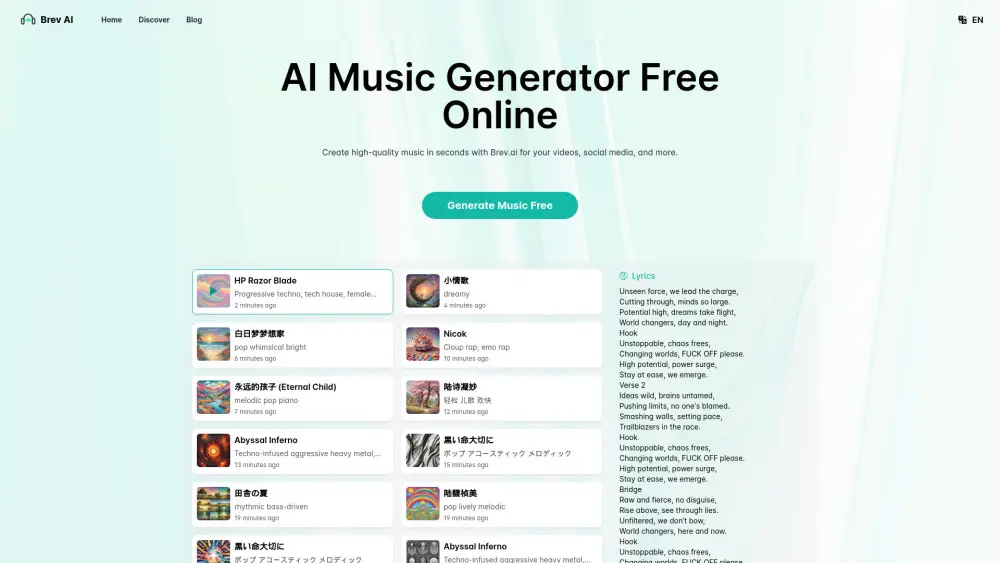
What if you could compose a full musical track simply by describing the mood, genre, and instruments you hear in your head? Brev.ai makes this a reality. This free online tool leverages advanced Suno V3.5 AI to transform plain text descriptions into high-quality, original music, democratizing music creation for everyone from complete beginners to seasoned creators.
Key Features
- Text-to-Music Generation: Core functionality that converts descriptive text prompts into complete musical compositions, handling melody, harmony, and rhythm automatically.
- Suno V3.5 AI Engine: Utilizes a state-of-the-art AI model specifically designed for high-fidelity audio generation, ensuring rich and coherent musical output.
- Genre Versatility: Capable of producing music across a wide spectrum of genres, from classical orchestral pieces to modern electronic beats and lo-fi hip-hop.
- Mood-Based Composition: Interprets emotional and atmospheric keywords in prompts to compose music that accurately reflects the desired feeling or vibe.
- Instrumentation Control: Allows users to specify desired instruments within their text prompt, influencing the AI's choice of sounds and layers in the track.
- Output Customization: Offers basic controls for influencing the output, such as adjusting the focus on specific elements mentioned in the prompt for a more tailored result.
- High-Quality Audio Export: Generates finished tracks in standard audio formats, enabling users to download and use their creations in various projects immediately.
- User-Friendly Interface: Features a simple, intuitive design centered on a text input box, making the music generation process accessible with no learning curve.
- Rapid Generation: Creates complete musical pieces in a matter of minutes, significantly faster than traditional composition or production methods.
- Royalty-Free Output: The music generated is original and typically free for personal use, removing concerns about copyright claims on created content.
Pros
- Absolute Cost Barrier Removal: Being completely free to use, it provides incredible value and opens up music creation to anyone with an internet connection.
- Unmatched Accessibility for Beginners: Eliminates the need for any knowledge of music theory, instrumental skill, or complex audio production software.
- Exceptional Speed and Efficiency: Drastically reduces the time from concept to a finished track, enabling rapid prototyping and content creation.
- Powerful Creative Inspiration: Serves as an excellent tool for overcoming creative block by generating unexpected musical ideas and starting points.
- High Output Quality: The underlying Suno technology produces surprisingly professional-sounding music that is coherent and well-structured.
- Simple and Intuitive Workflow: The process is incredibly straightforward—type a description and receive music—with no complicated settings or options to configure.
Cons
- Limited Creative Control: Advanced users may find the lack of detailed controls over tempo, key, song structure, and mixing frustratingly restrictive.
- Output Inconsistency: The AI can sometimes misinterpret prompts or produce results that vary in quality and accuracy, requiring multiple generation attempts.
- No Post-Generation Editing: The generated track is a final render; users cannot isolate or edit individual instrument stems, limiting refinement possibilities.
- Dependence on Prompting Skill: The quality of the output is heavily reliant on the user's ability to craft descriptive and effective text prompts.
- Potential Generic Output: While versatile, tracks can occasionally sound generic or lean on common musical tropes associated with the requested genre.
- Unclear Long-Term Viability: As a free tool, its future development, feature set, and continued availability are not guaranteed without a clear business model.
Use Cases
- Content Creator Soundtracks: Perfect for YouTubers, podcasters, and streamers to quickly generate unique, royalty-free background music and intros/outros for their videos.
- Creative Brainstorming and Demos: Musicians and composers can use it to rapidly generate ideas, motifs, or full demo tracks to build upon in their professional DAWs.
- Game Development Prototyping: Indie game developers can score their prototypes with custom mood-fitting music without licensing costs or a dedicated composer in early stages.
- Educational Demonstrations: Teachers can use it to demonstrate musical concepts, genres, and composition styles to students in an engaging and interactive way.
- Personal Projects and Gifts: Individuals can create custom music for homemade slideshows, wedding videos, presentations, or as a unique and personal gift.
- Advertising and Marketing Mock-ups: Agencies and marketers can generate placeholder music for commercial storyboards and mock-ups before commissioning a final score.
Quick Start Guide
1. Navigate to the Brev.ai website. 2. In the provided text box, type a detailed description of the music you want (e.g., 'An uplifting synthwave track with a driving bassline and nostalgic 80s drums'). 3. Click the generate button and wait a few moments for the AI to create your track. 4. Listen to the result and download the audio file for your use.
Conclusion
Brev.ai stands out as a remarkably powerful and accessible entry point into AI-generated music. Its greatest strength is its simplicity and zero cost, making it an invaluable tool for content creators, hobbyists, and anyone needing quick, original audio. While professional musicians will hit its limits regarding fine-grained control and editing, it excels as a brainstorming and prototyping tool. For its intended purpose—turning thought into sound instantly—it is highly effective. It is highly recommended for anyone looking to experiment with AI music generation without any financial or technical commitment.
Frequently Asked Questions
Yes, based on the provided data, Brev.ai is currently a free-to-use online tool. There is no indication of paid tiers or subscription plans, making all its features accessible at no cost.
While not explicitly stated, common limitations for free AI tools can include a maximum length per generated track (e.g., 1-2 minutes), a cap on the number of daily generations, and output in a standard quality like 128kbps MP3.
The licensing terms for AI-generated content are crucial. You must check Brev.ai's specific terms of service. While often free for personal use, commercial use may require explicit permission, attribution, or might be restricted altogether.
More detailed prompts generally yield better results. Instead of 'a sad song,' try 'a slow, melancholic piano piece with soft cello accompaniment in a minor key, evoking a rainy evening.' Specify genre, instruments, mood, tempo, and any other atmospheric details.
This depends on the capabilities of the underlying Suno V3.5 model. Some versions can generate AI-sung vocals based on lyrics, but you would need to experiment with prompts including lyrics to see if Brev.ai has implemented this feature.
No, Brev.ai provides a finished audio file download (like an MP3). You cannot edit individual tracks (stems) like the drums or melody separately within the tool. You would need audio editing software for any further changes.
The most common format for such tools is MP3 for its balance of quality and file size. However, the specific available formats (WAV, MP3) should be confirmed on the tool's website.
Many free AI tools allow generation without an account, but may require one for saving a history of creations or accessing higher generation limits. The need for an account for basic use is not specified in the data.