

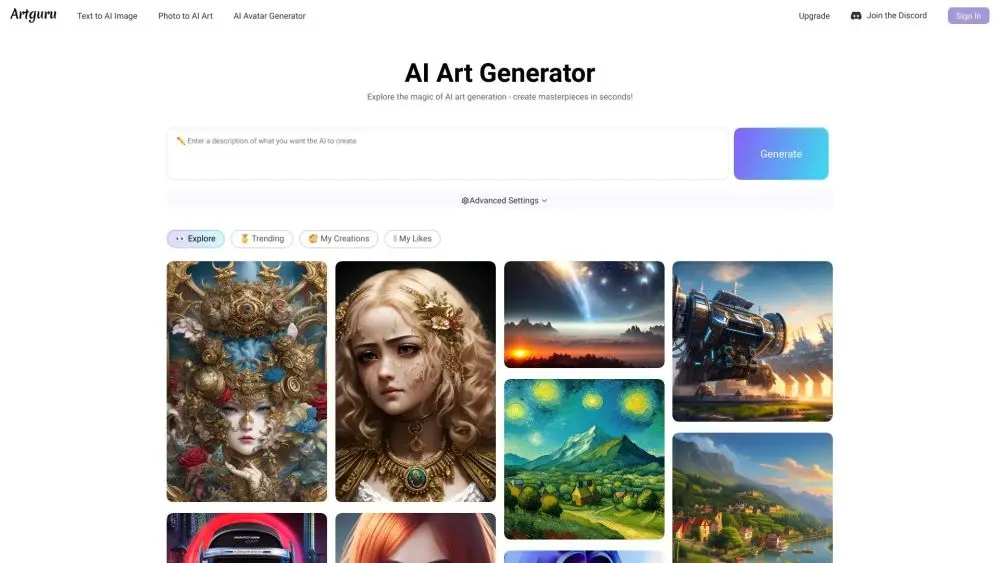
Overview
What if you could visualize any concept, no matter how abstract, in seconds? Artguru is a free AI art generator that transforms text prompts or uploaded images into unique, often stunning, visual artwork. It democratizes digital art creation, making it accessible to anyone with an idea, regardless of their technical skill or artistic training.
Key Features
- Text-to-Image Generation: Convert descriptive text prompts into detailed and stylized images, allowing for the creation of everything from photorealistic scenes to abstract concepts.
- Image-to-Image Transformation: Upload a base image to use as a style reference or starting point, which the AI then reinterprets based on your additional text guidance.
- Diverse Art Styles: Access a wide array of pre-set artistic styles, from oil painting and anime to cyberpunk and digital art, to quickly achieve a specific look and feel.
- High-Resolution Outputs: Generate images in high resolution, suitable for a variety of digital uses, though very large prints may require additional upscaling tools.
- Rapid Generation: Create multiple AI-generated images in under a minute, enabling fast iteration and exploration of different visual ideas and concepts.
- User-Friendly Interface: Navigate a simple and intuitive web-based platform that requires no prior experience with AI or complex design software to operate effectively.
- Free-to-Use Model: Access core image generation capabilities without any cost, subscription, or mandatory login, lowering the barrier to entry for new users.
- Creative Inspiration: Use the tool as a brainstorming aid to overcome creative block and rapidly visualize concepts for stories, characters, or artistic projects.
- Customization Controls: Adjust basic parameters to influence the output, guiding the AI's interpretation of your prompt for results closer to your initial vision.
- No Download Required: Operate entirely within a modern web browser on both desktop and mobile devices, with no need to install any software or plugins.
Pros
- Cost Accessibility: Being completely free removes financial barriers, making it an excellent tool for hobbyists, students, and anyone curious about AI art.
- Ease of Use: The straightforward process of typing a prompt and clicking generate makes it incredibly easy for absolute beginners to start creating immediately.
- Speed and Efficiency: The ability to produce visual concepts almost instantly dramatically accelerates the early stages of the creative and ideation process.
- Style Variety: The built-in selection of art styles allows users to experiment with different aesthetics without needing to craft complex stylistic prompts.
- No Learning Curve: Unlike professional design software, there are no complex tools or techniques to learn, focusing purely on the creative idea rather than execution skill.
- Idea Visualization: It excels at quickly bringing abstract ideas into a visual form, which is invaluable for writers, designers, and content creators.
Cons
- Limited Control: Compared to advanced tools like Midjourney or Stable Diffusion, it offers fewer parameters for fine-tuning, leading to less predictable results.
- Output Inconsistency: The AI can sometimes misinterpret prompts or produce artifacts, requiring multiple generations to get a usable image for a specific need.
- Resolution Constraints: While high-resolution for web use, generated images may not meet the required quality for large-scale professional printing without further processing.
- Lack of Advanced Features: Missing capabilities like inpainting, outpainting, or detailed seed control limit its utility for complex, professional artwork editing.
- Watermarks on Free Tier: Some free outputs may include a subtle platform watermark, which might be unsuitable for commercial projects without upgrading.
- No Integration API: The lack of an API prevents developers from embedding its capabilities directly into other applications or automated workflows.
Use Cases
- Concept Art Creation: Game developers and writers can quickly generate concept art for characters, environments, and items to visualize their ideas during pre-production.
- Social Media Content: Digital marketers and content creators can generate unique, eye-catching images for blog posts, social media updates, and marketing campaigns.
- Personal Art Projects: Hobbyists can create custom artwork for personal enjoyment, such as designing themed avatars, greeting cards, or desktop wallpapers.
- Storyboarding and Ideation: Authors and filmmakers can produce basic visual references for scenes and characters to aid in storytelling and presentation pitches.
- Educational Materials: Teachers and students can create custom illustrations to visualize historical events, scientific concepts, or literary scenes for presentations.
- Product Brainstorming: Entrepreneurs and designers can generate visual mockups of product ideas, logos, or brand motifs in various styles during early brainstorming phases.
Quick Start Guide
1. Navigate to the Artguru website. 2. Type a detailed description of the image you want to create into the text prompt box. 3. Select a desired art style from the available options. 4. Click the generate button and wait a few seconds to view and download your AI-generated artwork.
Conclusion
Artguru stands out as a remarkably accessible and user-friendly entry point into the world of AI-generated art. Its greatest strength is its simplicity and zero cost, making it ideal for beginners, casual users, and anyone needing rapid visual inspiration. However, its limitations in control and output consistency mean that professional artists and designers may quickly outgrow it, needing more advanced tools for commercial work. It is highly recommended for experimentation, brainstorming, and personal projects, but users with serious commercial intentions should view it as a stepping stone to more powerful, paid platforms.
Frequently Asked Questions
Yes, the core image generation features are currently free. There is no subscription required, though some generations might include a subtle watermark.
While free, the service may impose limits on the number of consecutive generations or the maximum resolution available to free users to manage server load.
You should carefully review Artguru's Terms of Service. Free tiers often retain certain rights or may require attribution, so commercial use might be restricted or require a premium plan.
No, Artguru currently operates solely as a web application and does not provide a public API for integration into other software or automated systems.
Use descriptive and specific language. Include details about style, subject, composition, mood, and lighting. Experiment with different artistic style filters provided by the tool.
It typically outputs images in common web formats like JPG or PNG. Specific format options are usually limited within the free version.
Yes, Artguru supports image-to-image generation. You can upload a photo or sketch to use as a stylistic or compositional reference for the AI.


