

Overview
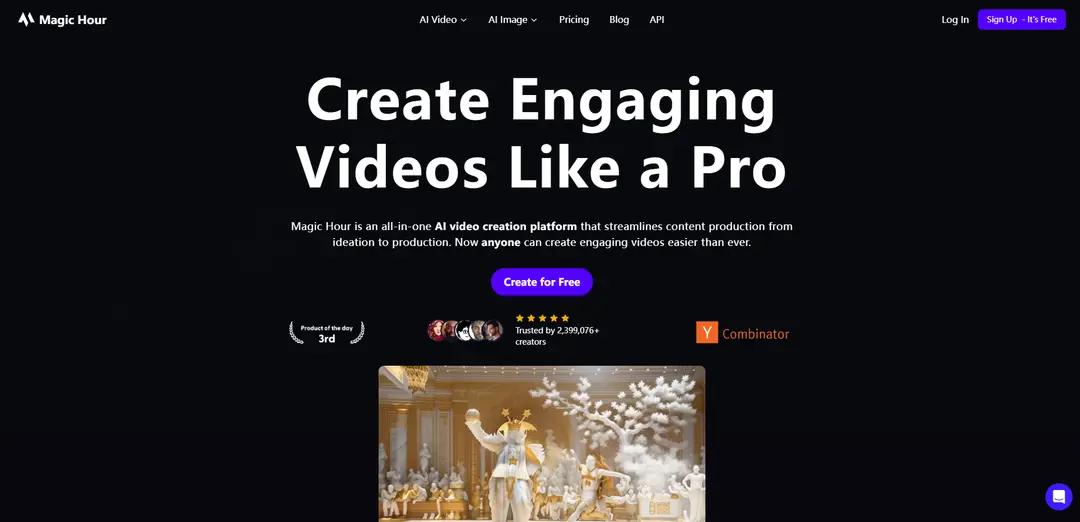
What if you could generate a professional video from a simple text prompt without a suite of expensive, complex software? Magic Hour is a browser-based AI creative studio and unified API that consolidates over 100 tools for video, image, and audio generation and editing into a single, accessible workflow, aiming to replace a multitude of specialized applications.
Key Features
- Unified Creative Studio: A browser-based hub with 100+ AI tools for video, image, GIF, and audio creation, eliminating the need to switch between disparate, specialized applications for a complete project workflow.
- Text-to-Video Generation: Transform descriptive text prompts into short video clips, providing a quick starting point for ideation and content creation directly from imagination.
- Image-to-Video Animation: Breathe life into static images by uploading them to generate animated sequences, ideal for creating dynamic content from existing photographs or artwork.
- Video-to-Video Style Transfer: Apply artistic styles or visual effects to existing video clips, allowing for complete aesthetic transformation of footage without manual editing.
- Face Swap Capability: Seamlessly replace faces in videos or images, useful for creating personalized content, parody, or special effects with a high degree of accuracy.
- Lip Sync & Talking Photos: Animate portraits by adding synchronized speech, turning a standard headshot into a talking avatar for engaging presentations or social content.
- Extensive Template Library: Access over 10,000 pre-designed templates for rapid creation of platform-specific assets, ensuring correct sizing for social channels without starting from scratch.
- API & SDK Integration: A single REST API with official SDKs for Python, Node.js, Go, and Rust enables automated, scalable content pipelines for developers and enterprise workflows.
- Personalization Workflows: Designed for repeatable tasks like virtual try-ons or customized messaging, allowing businesses to generate individualized creative assets at a large scale.
- Audio Editing Tools: Generate and edit audio tracks alongside visual media, supporting a holistic approach to multimedia project creation within the same platform.
- Background Removal: Isolate subjects in images or video clips with AI-powered background removal, simplifying compositing and creating clean assets for further use.
- Subtitle Generation: Automatically generate and burn subtitles into videos, enhancing accessibility and viewer engagement for social media and marketing content.
Pros
- Consolidated Workflow: Dramatically reduces toolchain complexity by offering a vast array of generation and editing features in one web-based studio, saving time and cognitive load.
- Developer-Friendly API: Comprehensive REST API with multiple official SDKs and support for async jobs via polling/webhooks makes it highly suitable for integration and automation.
- Accessible Free Tier: Core tools are available to try for free, often without mandatory sign-up, allowing users to experiment and evaluate the platform's capabilities risk-free.
- Template-Driven Efficiency: The massive library of templates accelerates production for marketers and creators, ensuring quick, platform-optimized outputs for various channels.
- Strong Personalization Features: Excellent support for scalable personalization use cases like face swap, making it a powerful tool for targeted advertising campaigns.
- No Local Processing Power Required: Being entirely browser-based, it offloads all heavy AI processing to the cloud, making it accessible on modest hardware.
- Unified Credit System: A single credit balance works across all tools and features, simplifying budgeting and usage tracking for individuals and teams.
Cons
- Potential Performance Variability: Output quality and processing times can be inconsistent across different tools and depending on server load, which may affect reliability.
- Complex Pricing for High Volume: While a free tier exists, calculating costs for high-volume or commercial use can be complex due to the credit-based system and various resolution tiers.
- Ongoing User Engagement Challenge: Traffic data suggests the platform may be struggling to retain users despite new features, indicating potential issues with user experience or market fit.
- Browser Dependency: Being exclusively web-based means performance is tied to browser capabilities and internet connection stability, with no offline functionality available.
- Steep Learning Curve for Full Capability: The sheer number of tools and options, while powerful, can be overwhelming for new users aiming to leverage the platform's full potential.
Use Cases
- Marketing & UGC Ad Production: Rapidly generate short promotional videos and personalized ad variants from text prompts or existing footage for cost-effective A/B testing and campaigns.
- Social Media Content Creation: Produce a high volume of engaging, platform-specific videos, animated images, and talking photos to maintain a consistent and dynamic social media presence.
- Personalized Video Messaging: Create scaled individualized video messages for marketing or communications by automating face swaps and custom lip-sync in template-driven workflows.
- Prototyping and Storyboarding: Quickly visualize concepts and narrative ideas by generating video sequences from text descriptions, accelerating the pre-production process for filmmakers.
- E-commerce Virtual Try-Ons: Implement AI-powered workflows to allow customers to visually 'try on' clothing or accessories using image-based style transfer and personalization features.
- Educational and Training Material: Develop engaging animated explanations and tutorials by transforming static diagrams into videos or creating presenter-like avatars from photos.
- Audio-Visual Podcast Clips: Repurpose long-form audio content into short, visually compelling video clips for social media promotion by pairing audio with generated imagery or animation.
Quick Start Guide
1. Visit the Magic Hour website and access the web studio; many core tools require no sign-up for initial tries. 2. Choose a tool like 'Text-to-Video,' enter a prompt, and generate your first asset. 3. Use the editing features to refine your output, or explore templates for faster creation, then export your final product.
Conclusion
Magic Hour presents a compelling proposition as a unified platform for AI-driven media creation, particularly for users and teams fatigued by managing a complex stack of single-purpose tools. Its extensive feature set and robust API make it a strong candidate for automated, scalable content production. However, its credit-based pricing requires careful calculation for heavy use, and its web-only nature may be a limitation for some. It is highly recommended for developers seeking to integrate AI media generation into products and for marketing teams needing to produce high volumes of personalized, templated content efficiently. New users should thoroughly exploit the free tier to gauge its suitability for their specific workflow before committing to a paid plan.
Frequently Asked Questions
Yes, core tools on Magic Hour can be tried for free, often without even creating an account. This allows for initial experimentation, though free usage typically includes watermarks and lower resolution outputs.
Credits are the platform's universal currency. Each AI generation or editing task consumes a certain number of credits, which varies based on the tool, output resolution, and processing priority. Subscription plans and prepaid packs provide credits.
The Magic Hour REST API has official SDKs for Python, Node.js, Go, and Rust, covering most popular backend development environments for easy integration.
Yes, the API fully supports asynchronous workflows. You can submit a job and then check its status later using polling or configure webhooks to receive a notification upon completion.
Commercial usage rights are typically granted on paid plans that provide watermark-free exports. Always check the specific terms of your subscription or credit pack for licensing details.
Output resolution depends on the specific tool and the plan tier. Higher-resolution outputs (e.g., 4K) are generally available on premium plans and consume more credits per job.
Like all such tools, it is intended for ethical use such as parody, satire, or creative storytelling with consent. Users are responsible for ensuring they have the right to use any source imagery and comply with local laws.


