

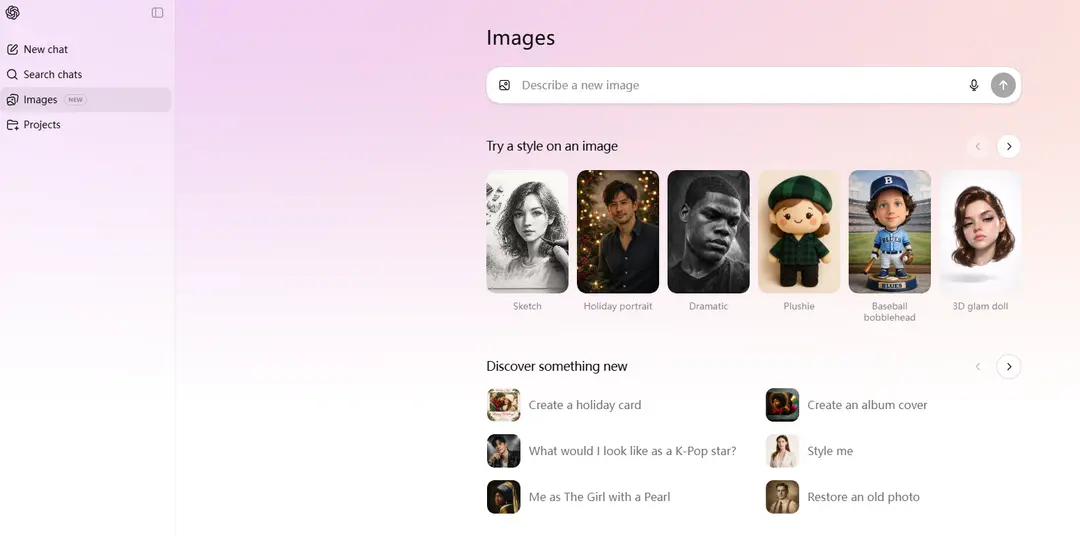
Overview
What if you could generate and refine images as easily as having a conversation? ChatGPT Images, powered by the GPT Image 1.5 model, makes this a reality. Integrated directly into the ChatGPT interface, this tool moves beyond simple text-to-image generation to offer a collaborative, iterative creative process. It represents a significant shift from standalone generators by combining powerful creation and precise editing capabilities within a familiar chat-based workflow, making advanced AI imagery accessible to a broad audience without requiring specialized software.
Key Features
- Accelerated Generation: Delivers image creation up to four times faster than its predecessors, significantly reducing wait times and improving workflow efficiency for both individual and batch processing tasks.
- Precise Instruction Adherence: Excels at interpreting and executing complex prompts, paying close attention to specific requests for style, composition, lighting, and color palettes with remarkable accuracy.
- Advanced Inpainting and Editing: Allows for detailed modifications to existing images with superior preservation of original details like lighting consistency and fine facial features during edits.
- Enhanced Text Rendering: Improves the historically challenging task of integrating legible text within images, handling dense or small font sizes more reliably than previous models.
- Conversational Refinement: Enables users to iteratively improve generated images through natural language follow-up prompts, such as requesting style changes or emphasizing specific elements.
- Dedicated Interface: Features a specialized 'Images' tab within ChatGPT, complete with preset filters and trending prompts to lower the barrier to entry for new users.
- Detail Preservation: Maintains high fidelity and consistency across multiple rounds of editing, ensuring core elements of an image remain intact during transformations.
- API Accessibility: The underlying GPT Image 1.5 model is available via API, allowing developers to integrate its advanced capabilities directly into custom applications and services.
- Preset Style Library: Offers a curated selection of artistic filters and styles, such as sketch or pop art, for quickly applying consistent visual themes to generated content.
- Global Availability: Accessible to all ChatGPT users worldwide through the standard platform, ensuring wide availability without complex setup procedures.
Pros
- Streamlined User Experience: The integration into the main ChatGPT interface creates a seamless workflow, eliminating the need to switch between different applications for text and image generation.
- Rapid Iteration Capabilities: The combination of faster generation times and conversational editing allows for quick exploration of ideas and rapid prototyping of visual concepts.
- High-Quality Output: Produces images with enhanced detail, realistic textures, and strong adherence to compositional guidelines specified in the user's prompts.
- Intuitive Learning Curve: The chat-based interaction model is familiar to millions of ChatGPT users, making the tool approachable for non-designers and professionals alike.
- Powerful Editing Suite: Goes beyond basic generation to offer robust editing tools that respect the original image's integrity, which is rare in all-in-one platforms.
- Strong Consistency: Maintains character and detail coherence when generating multiple images from the same prompt or when making sequential edits to a single image.
- No Specialized Software Required: As a web-based tool within ChatGPT, it is accessible from standard browsers without demanding high-end local hardware for processing.
- Active Development Backing: Being an OpenAI product, it benefits from continuous updates, improvements, and integration with the broader ecosystem of AI tools.
Cons
- Moderate Generation Time: Despite being four times faster, complex image generation can still take over a minute, which may interrupt creative flow for some users.
- Inherent AI Limitations: Like all generative models, it can sometimes produce illogical elements, artifacts, or misinterpret subtle nuances in highly complex prompts.
- Dependency on Prompting Skill: The quality of the output is heavily dependent on the user's ability to craft detailed, unambiguous instructions, which has a learning curve.
- Limited Control vs. Professional Software: While powerful, it does not offer the granular, layer-based control found in dedicated graphic design software like Photoshop.
- Potential for Inconsistency: There can be variability in output quality and style between different generation sessions, requiring regenerations to achieve the desired result.
- Subscription Barrier: Full access to the most advanced features likely requires a paid ChatGPT subscription, limiting the free tier's capabilities.
- Text Rendering Challenges: Although improved, generating perfectly accurate and stylized text within images remains a difficult task and can yield errors.
Use Cases
- Content Creation: Generating unique blog illustrations, social media graphics, and marketing banners quickly and cost-effectively without relying on stock photo libraries.
- Concept Art and Storyboarding: Rapidly visualizing ideas for films, games, or product designs, allowing artists and designers to iterate on concepts in real-time with clients.
- Educational Materials: Creating custom diagrams, historical recreations, or scientific visualizations to enhance learning resources and presentations for teachers and students.
- Product Prototyping: Visualizing product ideas, packaging designs, or architectural concepts in various styles and settings before committing to physical prototypes.
- Personalized Art: Crafting custom avatars, greeting cards, or decorative art for personal use by describing a desired theme, style, and mood in natural language.
- Iterative Design Projects: Refining a single image through multiple conversational steps, such as changing the season, time of day, or artistic style of a landscape.
- Advertising Brainstorming: Producing a wide array of visual concepts for ad campaigns based on copywriting, enabling marketing teams to explore creative directions rapidly.
- World Building: Generating a series of consistent environmental images, character designs, and objects for writers and game developers building fictional universes.
Pricing & Plans
ChatGPT Images operates on a freemium model. Access is integrated into the standard ChatGPT platform. Typically, OpenAI offers a free tier with limited usage and a subscription plan (like ChatGPT Plus) that provides priority access, higher generation limits, and access to the latest models, including GPT Image 1.5. Specific pricing and monthly allowances can be found on the official OpenAI website.
Quick Start Guide
1. Navigate to the ChatGPT platform and locate the dedicated 'Images' tab in the sidebar. 2. Describe your desired image in the chat using clear, detailed language, specifying style, subject, and composition. 3. Wait for the initial generation (typically under a minute) and review the result. 4. Use follow-up prompts to refine the image, such as 'Make the lighting more dramatic' or 'Apply a watercolor style filter.'
Conclusion
ChatGPT Images (GPT Image 1.5) successfully demystifies advanced AI image generation by embedding it into a conversational interface. Its greatest strength is not just the quality of the output, but the fluid, iterative process it enables. While it may not replace high-end, specialized design software for final professional work, it is an exceptional tool for ideation, rapid prototyping, and for anyone who needs to create visuals but lacks advanced design skills. It is highly recommended for content creators, marketers, educators, and hobbyists looking for a powerful yet accessible way to bring their ideas to life. For best results, invest time in learning prompt engineering techniques to fully leverage its capabilities.
Frequently Asked Questions
Yes, access to image generation is available through the standard ChatGPT interface, which typically includes a free tier. However, usage limits may apply, and full, unrestricted access likely requires a paid ChatGPT subscription.
Limitations often include a cap on the number of generations per day or month for free users, restrictions on generating certain types of content (e.g., violent or adult material), and potential delays during high-traffic periods. Paid subscribers generally receive higher limits and priority access.
You must review OpenAI's Terms of Use and Content Policy for the most current information on commercial usage rights. Policies regarding ownership and commercial application of AI-generated content can vary and are subject to change.
Its key differentiator is deep integration with ChatGPT, allowing for conversational refinement. It competes with tools like Midjourney and DALL-E, often prioritizing ease of use and iterative editing within a chat environment over highly granular, standalone control panels.
While specific technical details are updated by OpenAI, such tools typically generate images in common web formats like JPEG or PNG. The output resolution is generally high quality for digital use but may not be suitable for large-scale printing without upscaling.
Yes, one of the core features is precise editing. You can upload an image and use conversational prompts to instruct ChatGPT Images on specific changes, such as modifying objects, altering the background, or applying new artistic styles.
Yes, the underlying model, GPT Image 1.5, is available through an API, allowing developers to build its image generation and editing capabilities into their own applications, websites, and services.
Be specific and descriptive. Include details about style (e.g., 'photorealistic,' 'anime'), composition, lighting ('soft morning light'), colors, and mood. Use the conversational refinement feature to make incremental adjustments based on the initial output.


