

Overview
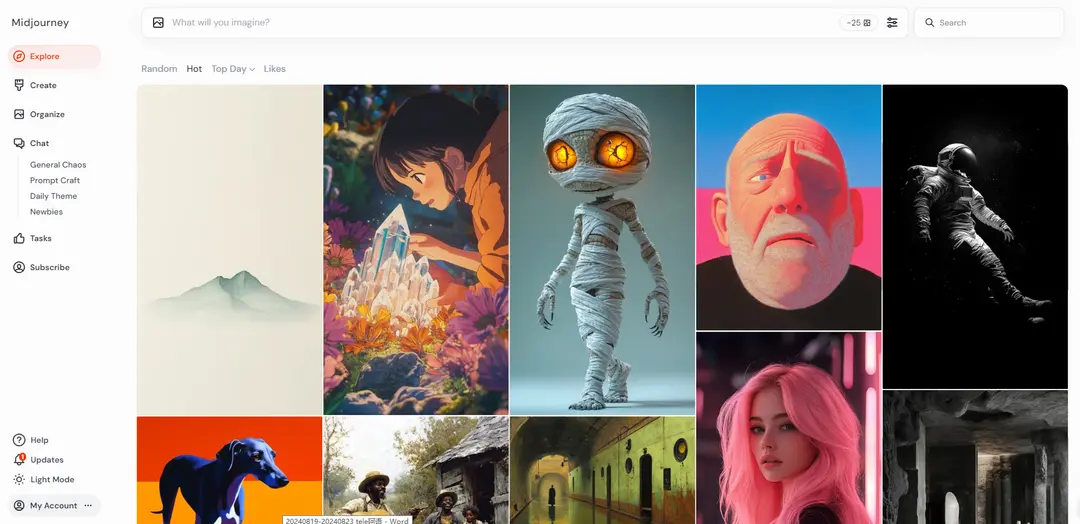
What if you could materialize any concept from your imagination into a high-resolution image within seconds? Midjourney makes this possible. This independent AI research lab has become a dominant force in text-to-image generation, leveraging advanced deep learning to translate descriptive prompts into stunning, often photorealistic, artwork. Its evolution includes a new web interface and collaborative tools, moving beyond its initial Discord-only roots to serve a broader creative community.
Key Features
- Text-to-Image Generation: Transforms detailed text descriptions (prompts) into four initial high-quality image options, which can be further refined and upscaled for maximum resolution and detail.
- Style Customization: Offers extensive control over the aesthetic output through adjustable parameters for color palette, texture, artistic style, and overall mood, often guided by reference images.
- Image Editing and Refinement: Provides tools to tweak generated images directly, including the ability to create variations (V1-V4), upscale selections (U1-U4), and modify specific elements of the composition.
- Patchwork Tool: A real-time collaborative feature for worldbuilding, allowing multiple users to contribute to and modify a shared visual canvas or environment seamlessly.
- Moodboards Feature: Enables users to organize, collect, and present creative ideas and inspiration through curated visual collections, streamlining the concept communication process.
- Web Interface: A standalone browser-based platform launched to expand accessibility, allowing users to generate images without being dependent on the Discord platform.
- Prompt Analysis: The AI deeply interprets complex and nuanced text prompts, understanding context, composition, lighting, and artistic styles to produce contextually accurate imagery.
- Rapid Iteration: Generates initial image batches in under a minute, enabling a fast-paced workflow for brainstorming, prototyping, and exploring countless creative directions quickly.
- Parameter System: Supports advanced commands within prompts to precisely control aspect ratios, stylization levels, chaos, image weighting, and which AI model version to use.
- Upscaling: Enhances the resolution and detail of any selected image from the initial grid, producing a final output suitable for high-resolution printing or detailed digital use.
- Reference Image Use: Allows users to upload an image to influence the style, color, or composition of the new generation, ensuring visual consistency across projects.
- Community Gallery: Provides access to a vast public library of images created by other users, serving as an invaluable resource for inspiration and understanding effective prompting techniques.
Pros
- Unmatched Image Quality: Consistently produces images with superior realism, artistic coherence, and fine detail compared to many other generators, especially in photorealistic and stylistic renders.
- Rapid Prototyping: Drastically accelerates the conceptualization phase for projects, allowing artists and designers to visualize ideas in minutes rather than days or weeks.
- Creative Empowerment: Democratizes high-end visual creation, enabling individuals without formal artistic training to bring their imaginative concepts to life with stunning fidelity.
- Active Development: The development team frequently releases significant updates that improve realism, coherence, and add new features, ensuring the tool stays at the cutting edge.
- Strong Community: A large, active user base on Discord and the web fosters knowledge sharing, prompt engineering tips, and a vast repository of inspiration and examples.
- Collaborative Features: Tools like Patchwork introduce unique real-time co-creation capabilities, making it valuable for team-based projects and worldbuilding sessions.
- Accessibility Options: The introduction of a web interface and an initial allotment of free generations lowers the barrier to entry for new users to experiment with the technology.
- Intuitive Workflow: The process of generating, selecting variations, and upscaling is logical and easy to grasp, making the learning curve for basic operation relatively shallow.
Cons
- Subscription Cost: Requires a paid subscription for sustained use beyond a very limited trial, which can be a barrier for hobbyists or those with minimal needs.
- Steep Learning Curve for Mastery: While basic use is simple, crafting precise prompts and mastering parameters to achieve exact desired results requires significant practice and skill.
- Limited Free Tier: The offering of 25 free image generations is restrictive for thorough testing and requires a financial commitment to explore the tool's full potential.
- Public by Default: Generated images are visible to other users on the public gallery unless you subscribe to a more expensive plan that enables private (stealth) mode.
- Abstract Prompt Challenges: The AI can struggle with highly abstract concepts, precise spatial relationships, rendering specific text, or accurately depicting complex anatomical details.
- No API Access: Unlike some competitors, Midjourney does not offer a public API, limiting its integration into automated workflows, custom applications, or third-party software.
- Computational Limits: Even on paid plans, users have a monthly limit on GPU processing time (Fast Hours), which can be consumed quickly during intensive usage periods.
Use Cases
- Concept Art and Storyboarding: Game developers and filmmakers rapidly generate environment concepts, character designs, and storyboard frames to visualize narratives and worlds early in production.
- Marketing and Advertising: Creation of unique, royalty-free visual assets for social media campaigns, blog post featured images, and ad creatives tailored to specific brand aesthetics.
- Architectural Visualization: Architects and interior designers produce inspirational moodboards and conceptual renders of building exteriors, rooms, and landscapes from descriptive prompts.
- Product Design and Prototyping: Generation of product concepts, packaging ideas, and lifestyle images that place conceptual products in realistic settings for presentation and feedback.
- Authors and Writers: Bringing fictional characters, settings, and scenes described in books to life, providing visual aids for readers or inspiration for the writing process itself.
- Educational Content: Teachers and content creators generate accurate historical scenes, scientific diagrams, and complex abstract concepts as visual aids to enhance learning materials.
- Fashion and Apparel Design: Experimenting with clothing designs, textile patterns, and fashion photography concepts in various styles and on different model silhouettes.
- Personal Art Projects: Digital artists use it as a brainstorming tool to overcome creative block, generate base images for further refinement, or create complete standalone pieces.
Pricing & Plans
Midjourney operates on a subscription model with no permanent free tier. It typically offers a limited number of free generations for new users. Paid plans are tiered (e.g., Basic, Standard, Pro, Mega), starting from approximately $8 to $48 per month. These tiers primarily differ in the monthly allocation of GPU time (for faster generations), the ability to run jobs concurrently, and access to private generation mode.
Quick Start Guide
1. Sign Up: Visit the Midjourney website and join the Beta or their Discord server. 2. Subscribe: Choose a paid plan that fits your needs. 3. Generate: In a Discord channel or the web app, type '/imagine' followed by your descriptive prompt. 4. Refine: Use the U1-U4 buttons to upscale your favorite image or V1-V4 to create new variations of it.
Conclusion
Midjourney stands as a powerhouse in the AI image generation space, primarily distinguished by the exceptional quality and artistic nuance of its output. Its value is clearest for professionals and serious enthusiasts in creative fields who require high-fidelity visual prototypes and assets. The recent expansion to a web interface and the addition of collaborative tools like Patchwork significantly improve its accessibility and utility for teams. While the subscription cost and need to learn prompt engineering are notable considerations, the return in terms of creative speed and capability is substantial. It is highly recommended for artists, designers, marketers, and anyone who needs to bridge the gap between imagination and visual reality efficiently. For casual users, the limited free trial is worth experimenting with, but a paid plan is necessary for any serious application.
Frequently Asked Questions
Midjourney offers a limited trial, typically around 25 image generations, for new users to test the service. After exhausting these free prompts, a paid subscription is required to continue generating images.
Plans differ primarily in the monthly allotment of GPU time for fast generations, the number of jobs you can run concurrently, and whether you can generate images in Private Mode (stealth) where your images are not visible in the public gallery.
Generally, yes. If you are a paying subscriber, you own the assets you create and can use them for commercial purposes (e.g., in books, on merchandise, in advertising), subject to Midjourney's Terms of Service. Users on the free trial grant Midjourney a broader license.
Yes. Midjourney launched a web interface in August 2024, allowing users to generate and manage images directly on their website without needing to use Discord.
Use specific, descriptive language. Reference artistic styles, photographers, or specific mediums (e.g., 'oil painting', 'cinematic photo'). Specify lighting, composition, and mood. Study the community gallery to see the prompts behind images you admire.
The initial grid produces four lower-resolution images. Upscaling a selected image significantly increases its resolution, making it suitable for large-scale prints and high-definition digital displays. The exact maximum resolution depends on the model version and upscaler used.
No, as of now, Midjourney does not offer a public API for developers to integrate its image generation capabilities into other applications or automated workflows.
Patchwork is a collaborative feature that allows multiple users to work on a shared visual canvas in real-time. It's designed for team-based worldbuilding and creative projects where contributors can add to and modify a collective piece.


